Store shows in memory


The "large" NetPort cards (not NetPort LC) offers the DMX controlled playback of prestored shows from the cards memory. Up to 256 shows or animations can be stored, and recalled from DMX. Furthermore, there are various manipulations available, such as rotation, zooming, offset, and more, which are again controllable by DMX channels, for any live show control. The files are uploaded into the cards memory via network host.
With the menu point "Show management", the interface can be accessed.
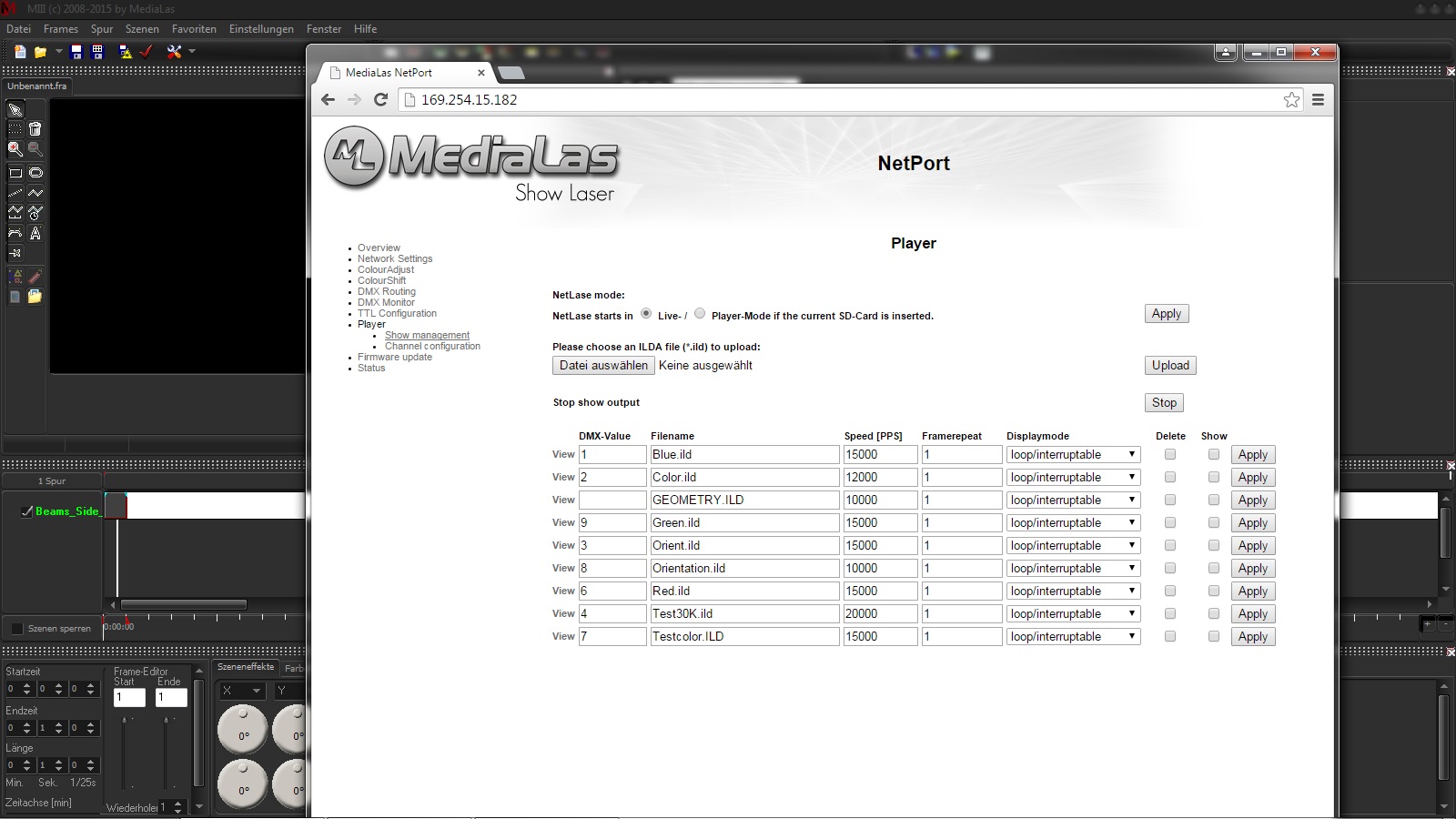
First, the selected ILDA animation files are stored onto the memory inside the NetPort cards. Select your file, and upload it to the memory. The file will show up in the file list. Now, this file needs to be routed to a DMX value between 1 and 255. Now set the correct value of the Speed (pps). If you are unsure, how fast you can scan, start with 15,000pps, and then slowly increase. You can change this setting at any time. Do not forget to store the settings with "Apply".
If the card should run in DMX playback mode, you need to set the cards mode to "Player mode". Press apply, and reboot the card by switching pwoer off and on.
AUTOPLAY
A nice feature is the autoplay function. A show or animation will be displayed immediately after switching the cards power on. Simply set the DMX value of the automated show to "0".